How does KDS improve coordination between dining room and kitchen?
Chloé Thévenet
Updated on:
29 April 2026
Share this article
What restaurateur can boast of never having experienced a service where nothing goes according to plan? An order forgotten, a dish sent to the wrong table, a waiter running between the dining room and the kitchen to find out "where 12 is". Every professional in the industry dreads these tense moments. And yet, the key to smooth service often lies in one basic element: coordination between the dining room and the kitchen.
Today, digital tools are reinforcing the teams to simplify this communication. Among them: the KDS (Kitchen Display System).
What is a KDS?
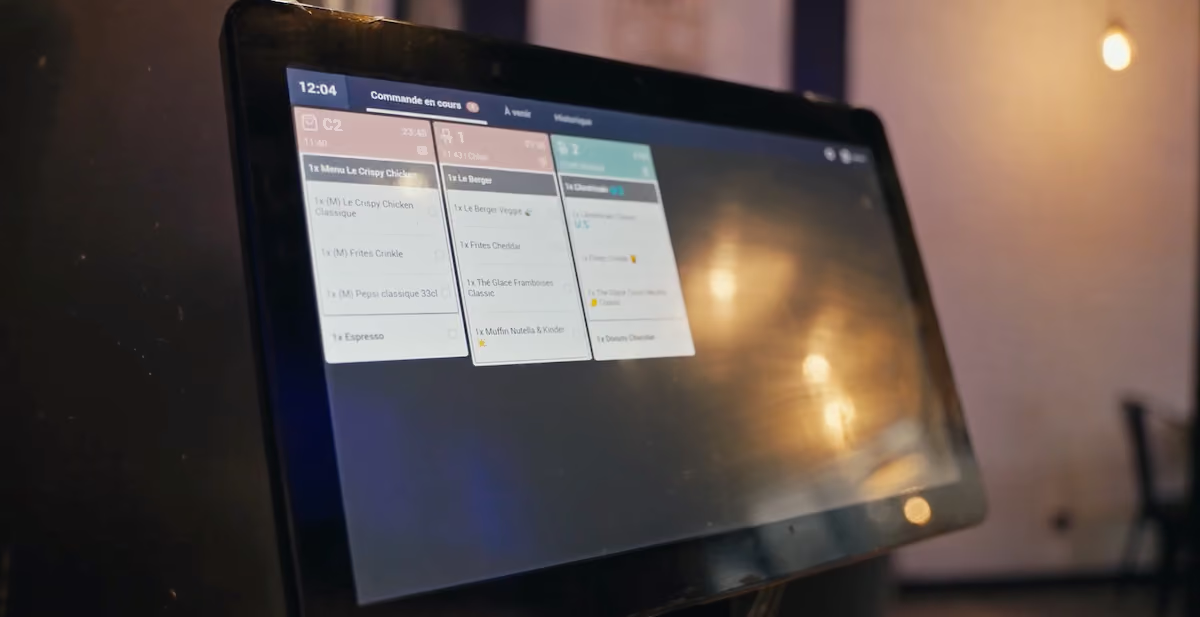
The KDS, or kitchen display screen, is linked directly to your cash register system. As soon as an order is validated, it appears instantly on the kitchen screen. Each dish is detailed, with its specific characteristics: cooking, accompaniment, allergen, table concerned, etc.
Cooks see in real time what they have to prepare, while waiters follow the progress of the dishes. No more paper slips going astray, orders shouted in a hurry or useless back-and-forth: everyone works on the same clear, up-to-date information base.
Room-kitchen communication: an ongoing challenge
Communication errors: a financial drain
Between the stress of the shot and the multiple ordering channels (on-site, takeaway, delivery, etc.), mistakes can quickly add up. Forgetting to mention "without sauce", using the wrong table, cooking the wrong dish - all these details can tarnish your customers' satisfaction and eat into your margins.
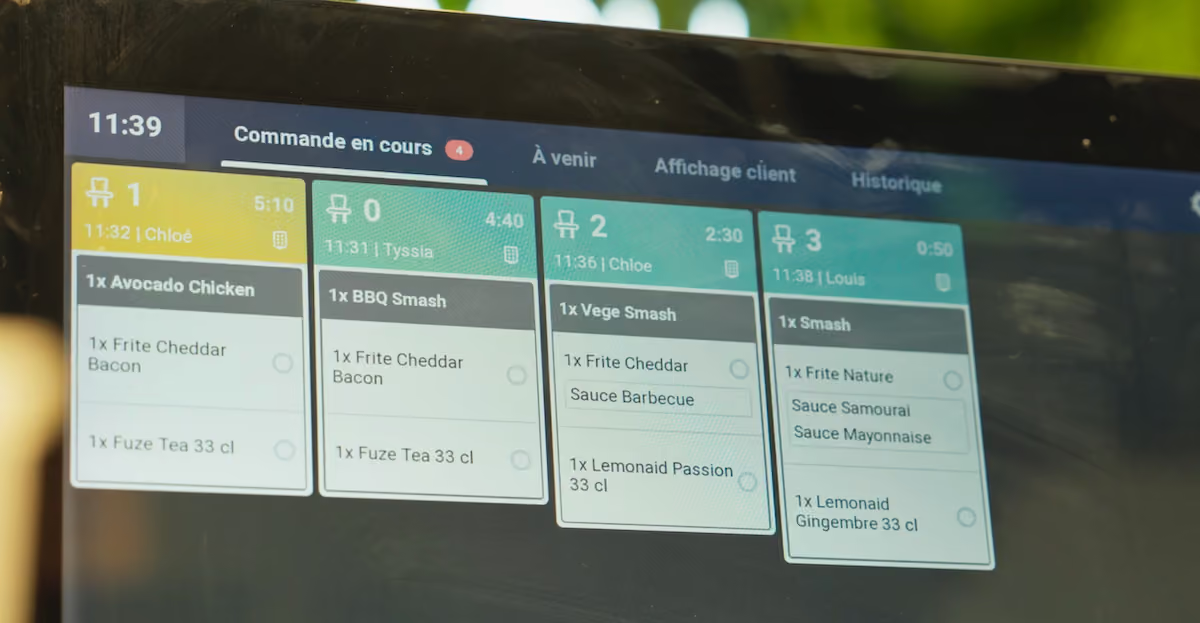
Specifically, each order is displayed with a color code indicating its status: pending, being prepared, ready to ship.
Orders can be sorted by category (hot dishes, cold dishes, beverages) so that each chef sees only the orders relevant to them.
As soon as a dish’s status changes, the update is immediate and visible both in the kitchen and in the dining room.
Endless delays: a drag on the customer experience
When the room waits too long, the pressure mounts on both sides. Waiters get stressed, the kitchen gets overcrowded, and service becomes disorganized. This disorganization has an immediate impact on the customer experience: a delayed dish generates frustration and slows down table turnover. This point is all the more crucial given that 40% of consumers today consider the overall service experience to be a decisive criterion when choosing a restaurant.
Paper tickets and oral exchanges: obstacles to the smooth running of the service
Good paper is still widely used in many French kitchens, but it quickly shows its limitations: illegible, lost, badly positioned, etc. Oral communication, however human and instinctive it may be, also presents risks as soon as the volume of orders increases. A simple misunderstanding, sometimes even a minor one, is enough to disorganize an entire department.
KDS or printer: Which is the right choice for your situation?
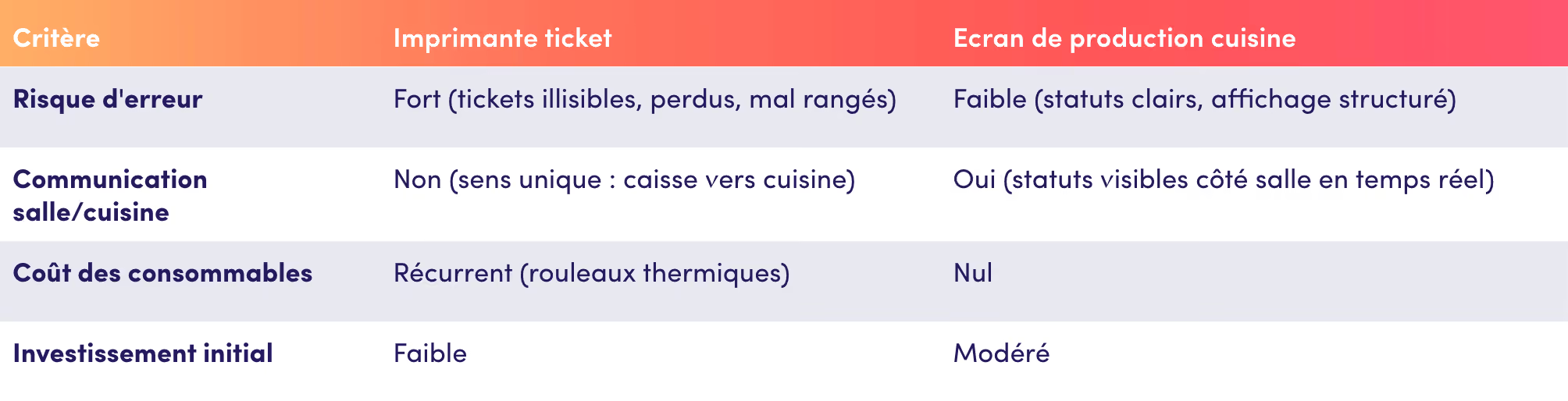
This question often comes up at the start of a project: ticket or production screen? Both transmit orders to the kitchen, but their operational impact is worlds apart.
The daily experiences of some restaurant owners clearly illustrate this point.
The founder of Double XL tested both approaches at the same time before making a decision:
"We started out using KDS along with paper tickets, but eventually we realized that the paper tickets were no longer useful. It involved a lot of manual handling, many extra steps, wasted time, and, above all, a lot of errors."
KDS, a digital ally to streamline service
View orders in real time for greater clarity
With the KDS, all orders appear instantly on the screen, sorted by table or by order of arrival. Each station knows exactly what to prepare, how to do it and in what order, eliminating confusion and allowing the kitchen to keep control of its rhythm. Servers, meanwhile, save time and can concentrate on the customer experience.
Reduce errors and ensure total traceability
The KDS drastically reduces the number of oversights and errors. Cooks can visualize the specifics of each order (cooking, allergies, options), while the front of house can monitor progress live. The status of each dish changes from "in preparation" to "ready", making service safer and allowing impatient customers to be easily informed.
Manage priorities and positions in real time
In the kitchen, everything moves quickly. The production screen allows orders to be prioritized by urgency and assigned to the appropriate stations: hot, cold, and assembly. Visual alerts flag orders that are nearing their deadline, without requiring the head waiter’s intervention.
This approach is particularly effective in multi-channel stores, where in-store, click-and-collect, and delivery orders come in all at once.
Albert, the founder of Alfi, says:
"With KDS, Innovorder makes my job easier. All orders appear on the screen. Even Uber Eats orders come directly to the KDS—it’s perfect."
When each channel has its own visual identifier on the screen, confusion is automatically eliminated.
Improve synchronization between dining room and kitchen to ensure smooth service
The KDS facilitates real-time coordination : waiters know immediately when an order is ready, and the kitchen can better manage peaks in activity. This synchronization reduces team stress and speeds up service, significantly reducing the average waiting time for customers.
The 4 measurable benefits of a KDS in the foodservice sector
1. Faster workflows and boosted productivity
Every minute saved on an order means a better-served customer and a table freed up more quickly. By eliminating manual steps, the KDS helps to boost productivity. Teams can concentrate on quality and pace, rather than logistics.
2. Precise monitoring of performance and preparation time
The KDS records every action: preparation time, average time per dish, time between entry and dispatch, etc. All this data gives you invaluable visibility for adjusting your processes and better distributing tasks according to peaks in activity.
3. A smoother customer experience and stronger loyalty
When everything runs smoothly, the customer feels it. The dishes arrive together, hot and as ordered. Satisfaction soars, as does the likelihood of seeing that customer again. Smooth service is one of the most effective ways of building an image of reliability over time.
4. Rapid, measurable return on investment
A KDS may represent an initial investment, but the benefits are felt very quickly. By reducing errors, speeding up service and optimizing yields, you improve your establishment's overall profitability. Many restaurateurs see a return on their investment in just a few months.
Implementing a successful KDS in your restaurant
Define your format requirements
Fast casual, table service, dark kitchen: each concept has its own specificities. The right KDS is the one that adapts to your organization and pace. Note that some tools, like those from Innovorder, are modular and can be easily integrated into different establishment formats.
Involve the kitchen and dining room teams from the outset
A KDS won't transform a department on its own; it's your teams and their level of support that will make it a success. Involve them in the project from the outset: show them how the tool simplifies their day-to-day work, reduces stress and facilitates communication. A test phase lasting just a few days is often enough to convince them of its usefulness.
Connect the KDS to your cash register and other digital tools
To unlock the full potential of the KDS, integrate it with your POS system and other digital solutions (online ordering, kiosks, delivery).
This integration creates a truly seamless and cohesive ecosystem, where information flows smoothly from the customer all the way to the kitchen.
Teams manage a unified workflow, regardless of where the order comes from.
Three technical precautions can help prevent unexpected problems at launch:
- Check that your KDS is compatible with your POS software: some systems operate as closed ecosystems and limit third-party integrations.
- Configure the dispatch rules before going live: specify which orders are routed to which production station, based on the channel or dish type.
- Test the workflow under real-world conditions before launch: simulate a full service across all your channels to ensure orders are processed without delay or loss.
Measure results and adjust your processes
Finally, monitor your indicators: average preparation time, team satisfaction, customer feedback. These data will enable you to adjust your processes and maximize the system's performance over the long term.
After these few lines, it's impossible to think of the KDS as just another screen in your kitchen. By streamlining communication between the dining room and the kitchen, it brings clarity, serenity and performance. Fewer errors, less stress, greater customer satisfaction - that's the triple promise of digital technology when it's properly integrated into your daily routine.
FAQ - Frequently Asked Questions About KDS in the Foodservice Industry
What is the difference between a KDS and a kitchen printer?
The printer prints a one-way paper receipt: once printed, it cannot be modified. The KDS displays orders in real time on a screen, with statuses updated continuously (pending, preparing, ready). Waitstaff can track the progress from the dining area, which a printer cannot do.
Is KDS compatible with food delivery services (Uber Eats, Deliveroo, etc.)?
Yes, provided your KDS is connected to a POS system that integrates with delivery aggregators. Third-party orders are then displayed directly on the screen, with a unique visual identifier for each channel, which helps prevent confusion in the kitchen.
Can multiple KDS systems be used within the same facility?
Yes. A restaurant can set up multiple screens at each production station (hot, cold, beverages, assembly) and configure dispatch rules so that each station receives only the dishes intended for it. This is particularly useful in high-volume establishments or dark kitchens.
How long does it take to train your team on a KDS?
It usually doesn't take long to get the hang of it—anywhere from a few hours to two or three days, depending on the system. The interface is designed to be intuitive: cooks interact with just one or two actions (confirm, mark as ready). In most cases, a test run before the actual service is sufficient.
After reading this, you’ll never think of the KDS as just another screen in your kitchen again. By streamlining communication between the dining room and the kitchen, it brings clarity, peace of mind, and improved performance. Fewer mistakes, less stress, and greater customer satisfaction: that’s the threefold promise of digital technology when it’s seamlessly integrated into your daily operations.
-
Why not make the switch to simpler, more connected management? Our Innovorder experts will help you step by step to improve coordination between the dining room and the kitchen.
"With 20 years' experience working for some of the world's largest foodservice groups, I'm helping the sector with its digital transformation through innovative digital solutions."
"With solid experience in developing key accounts, I'm supporting the digital transformation of the foodservice sector by proposing innovative digital solutions to optimize operations."