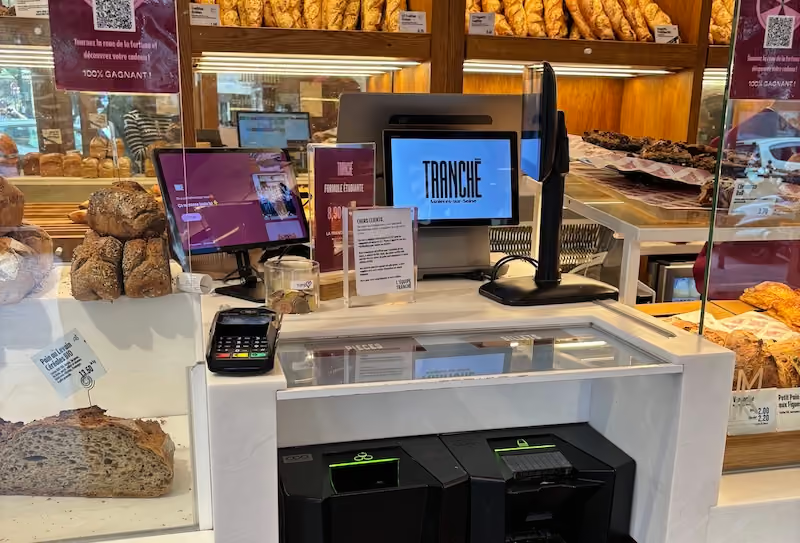
When it comes to equipping or upgrading the dining room, the same question always comes up: Is it better to equip servers with touchscreen pads or to centralize everything on a fixed cash register at the counter? However, pitting these options against each other is the wrong approach. Each piece of equipment serves very specific needs, from handling peak service times in the dining room to closing out the register.
What a fixed cabinet does, and what the pad doesn't do
Sitting on the counter, the stationary cash register remains the restaurant’s central hub. Trying to do away with it in favor of an all-digital system is a risky move.
The Central Collection Point
The countertop cash register serves as the visual and physical centerpiece of the restaurant. This is where the most time-consuming tasks take place: closing out the register at the end of the shift (the famous “Z-report”), counting the cash in the cash drawer, managing deposits, and giving change.
It offers a high level of comfort while working, thanks to a large screen (15 to 17 inches) that makes it easy to see the entire floor plan and assign tables during busy periods.
The Foundation for Compliance and Archiving
In accordance with the VAT Anti-Fraud Law (Section 88 of the 2016 Finance Act), all point-of-sale systems must ensure that data cannot be altered, is secure, and is properly stored and archived.
The fixed-line cash register functions as a local server or a certified secure relay. In the event of a tax audit or an internet outage, its rugged storage ensures that your sales history is preserved without any risk of losing sensitive data.
Management and Back-Office Operations
It is at the cash register that the owner or manager analyzes the day's ratios, adjusts the technical sheets, modifies the menu in real time, handles difficult cancellations, or closes out the day's accounting.
The user-friendly design of a large screen makes it possible to perform these complex administrative tasks quickly and without data entry errors.
The Printing and Peripheral Connection Hub
The fixed cash register centralizes all wired connections: the automatic cash drawer, the fixed card reader (TPE), the customer receipt printer, the customer display, and the connected scale. It serves as a stable printing gateway to the kitchen and bar, without relying exclusively on a Wi-Fi signal.
Service Continuity in the Event of a Wi-Fi Outage
Connected via a wired connection (Ethernet) and running on a local server, the fixed-location POS system is immune to wireless network outages. If the venue’s Wi-Fi or internet connection goes down during a busy rush, your mobile terminals may lose the signal, but your fixed-location POS system will continue to keep the business running without interruption.
The Integration and Security Hub
In addition to peripheral devices, the fixed register centralizes external data flows (delivery platforms, reservation software, accounting) and secures sensitive transactions. It manages staff access rights (via badges or manager codes) to authorize deliveries, cancellations, or the opening of the cash drawer.
What a pad does, and what a fixed box doesn't
The order pad is a game-changer in the dining room: it brings all the features of the cash register directly to the customer's table.
Take the order where the customer is
With a tablet in hand, the front-of-house team enters drink orders, appetizers, meat doneness, and side dish options right at the table. The order is sent instantly to the kitchen and the bar with a single tap on the screen, before the server has even moved from the table.
Eliminate data entry errors and unnecessary back-and-forth communication
Gone are the days of hastily scribbled notes in a paper notebook, which have to be deciphered ten minutes later in the kitchen—with the risk of forgetting an add-on or making a data entry error. By entering the order directly into the tablet, the information sent to the kitchen matches exactly what the customer ordered.
This eliminates the need for staff to make trips back and forth to the fixed register, saving your servers valuable time that they can then devote to advising customers, upselling, and providing personalized service.
Cover the patio and outlying areas
If you have a large patio, a second floor, or a room with a corner layout, the pad is practically indispensable. It saves staff from having to walk exhausting distances and reduces wait times for customers on the patio, who are often neglected in traditional setups.
Collect payment at the table
Modern tablets equipped with a TPE reader—or paired with a mobile TPE—allow you to enter the bill, split the check among diners, apply a meal voucher, and have the customer pay directly at the table. This speeds up table turnover and eliminates the wait at the end of the meal.
Real-Time Out-of-Stock Management
Unlike a paper menu, the synchronized menu instantly shows when a dish or wine is out of stock. The server sees this on their screen when taking the order, which prevents them from selling an unavailable item and having to go back to apologize to the customer.
👉 See also: How to digitize the order-taking process for table service
Why the question “one or the other” is poorly phrased
Contrasting a fixed cash register with a mobile payment terminal is a strategic mistake. These two tools are not competitors, but rather complementary.
The pad complements the drum set; it does not replace it.
The pad is a field tool. While it allows you to enter and process transactions on the go, it relies entirely on the settings, menu, and database stored on the desktop POS system or cloud server.
The rare cases in which a fixed-rate plan alone is sufficient
A very small restaurant with seating for 15 to 20 guests in a single room, featuring an ultra-short customer flow and a single server, can operate with just a fixed-position cash register without experiencing any noticeable slowdowns.
The rare cases in which a fixed cash register is not necessary
Only certain ultra-mobile or purely event-based concepts (food trucks, pop-up stores) can operate solely with mobile devices connected to the cloud. But for a traditional restaurant with full table service, doing without a fixed point-of-sale system weakens the overall infrastructure.
Comparison: Fixed Case vs. Control Pad
- Order Taking - Fixed cash register: stationary at the counter, requiring customers to walk over to it. Pad: portable, placed directly at the table.
- Customer Payments - Fixed Register: ideal for the counter (cash, cards, checks). Tablet: fast service at the table (credit cards, meal vouchers, splitting the bill).
- Compliance and Archiving - Fixed Terminal: Secure, certified central node. Pad: Relay dependent on the central server or the fixed terminal.
- Operations and Back Office - Fixed Cash Register: Full access (inventory, ratios, Z-close, floor plan). Pad: Limited to the department’s operational functions.
- Network dependency - Fixed unit: very low; it operates locally offline. Pad: moderate to high; it requires a stable Wi-Fi or 4G connection.
- Device Connectivity - Fixed POS: Direct and wired (cash drawer, printer, scale). Pad: Wireless (network or Bluetooth printers).
- Team Training - Fixed Register: Managers must undergo comprehensive training. Pad: Intuitive to use in just a few minutes; convenient for seasonal workers.
- Failure Management - Fixed Terminal: In the event of a failure, the counter comes to a standstill. Pad: In the event of a failure, another pad takes over.
The variables that determine your configuration
To choose the right equipment, there's no need to copy your neighbor. Instead, consider these five factors specific to your establishment.
- Number of seats and table turnover: When serving more than 40 to 50 customers and requiring a fast table turnover at lunchtime, the time saved by using the tablet becomes a key factor.
- Number of lines and floor layout: The more servers you assign to separate lines, the more individualized mobile order entry helps prevent crowds from forming in front of the counter screen.
- Patio and distance between dining room and kitchen: An outdoor patio or a kitchen located on a different level makes the “pad” difficult to bypass, to prevent staff burnout and delays.
- Team size and stability: If you employ a lot of seasonal workers or students, the simplified interface of a tablet reduces training time to just a few minutes.
- Single location or chain: For a restaurant group, combining a ruggedized fixed-position POS terminal with a fleet of cloud-synced tablets is the only way to ensure data consistency.
👉 See also: How to Digitize Service Without Dehumanizing the Customer Experience
Three typical configurations
Each type of facility has its own organizational structure: here is the equipment suited to the main scenarios.
1. Neighborhood bistro (seating 30 to 40 people)
Recommended setup: one fixed cash register at the counter and one or two portable terminals for the floor staff.
The cashier manages the counter, the coffee bar, and closing up at the end of the night. The pad streamlines order-taking during the lunch rush and allows for quick table service without creating a line at the counter.
2. Brasserie (seating for 80 to 120 guests, including the patio)
Recommended setup: one fixed register at the counter, three to four mobile terminals (one per row or section), and two production printers (kitchen and bar).
Orders are sent to the kitchen in real time, and the patio is covered without any delay. The time saved on back-and-forth trips is directly reinvested in serving customers at their tables, which leads to additional sales.
3. Multi-location chain or restaurant group
Recommended configuration: one fixed master register per location, a fleet of touchscreen terminals, and a centralized cloud-based back office.
You get automatic consolidation of accounting data from all locations, centralized card management, and instant deployment across all tablets in the network.
Budget: How Much Each Brick Costs
Initial Investment and Subscription
The cost of a complete fixed-station register system (touchscreen, cash drawer, receipt printer) generally ranges from €1,200 to €2,500 (excluding tax) for a one-time purchase, or starts at €60 to €120 per month for a software and hardware subscription.
For a professional control pad, expect to pay between €500 and €800 (excluding tax) for equipment per terminal and approximately €49 per month for the subscription.
What to Consider Beyond the Equipment
Hardware isn't everything. For the pads to work without interruption, a dedicated professional Wi-Fi network is essential: expect to spend between €300 and €800 to avoid dead zones inside the venue or on the patio. Add to that the costs of initial setup and staff training.
Rapid Amortization
With an average check of about €23.20 at traditional restaurants in France (source), the payback calculation is quick. All it takes is for the tablet’s efficiency to allow a server to turn over one more table, or to add two desserts and two coffees per service, to recoup the cost of the equipment in just a few weeks.
Compliance: What Exactly Is Covered by the Certificate?
What the Law Requires of the Payment Collection System
As of January 1, 2018, all VAT-registered businesses that record customer payments using point-of-sale software must use a system that meets the requirements for data integrity, security, retention, and archiving (Article 88 of Finance Law No. 2015-1785).
This compliance can be demonstrated either by a certificate issued by an accredited body (NF525 or LNE) or by an individual attestation from your software vendor—since self-certification was reinstated by the 2026 Finance Act. In either case, request written proof before signing.
Does every terminal need to be covered?
Yes. The entire data entry and payment processing chain must meet these criteria. When you use an order pad, it is considered part of the overall payment processing system. If it is directly connected to your compliant point-of-sale solution, you are in compliance.
Penalties You Should Be Aware Of
Failure to provide a valid certificate or attestation is punishable by a fine of €7,500 per software program or point-of-sale system, with a requirement to come into compliance within 60 days.
FAQ - Control Pad or Fixed Cash Register
Will an order pad still work if the restaurant's Wi-Fi goes down?
In a professional setup, a local server maintains synchronization between the payment pads, the cash register, and the printers even if the box goes down. Some terminals also automatically switch to a 4G or 5G network. This is the technical detail you should verify with your service provider before signing the contract.
What is the average lifespan of a control pad in a restaurant?
A reinforced professional-grade tablet (shock-resistant, splash- and grease-resistant) has an average lifespan of 3 to 5 years under heavy use, which is significantly longer than that of a consumer-grade tablet subjected to the same level of use.
Can regular smartphones or tablets be used as pads?
It is technically possible with certain apps, but not recommended for the restaurant industry. Consumer-grade devices are not very resistant to repeated drops, their batteries rarely last a full shift, and they do not have a built-in, ruggedized credit card reader.
Is it difficult to train seasonal servers to use a tablet?
No. Modern interfaces are designed like intuitive mobile apps, and the pad typically mirrors the menu and key layout of your register. A new server can get the hang of the tool in just a few minutes, guided step by step through cooking options, sides, and add-ons.
How does the pad communicate with the printer in the kitchen?
The pad transmits the order via the local network to the point-of-sale server, which sends it to the thermal printer or the kitchen production screen. The order is printed in a matter of seconds.
Is it possible to take a customer's payment directly at the table using a tablet?
Yes. Using hybrid tablet and POS terminals, or by pairing a tablet with a portable wireless POS terminal, the dining room staff can edit the bill, split the check, and accept payment by credit card or meal vouchers right at the table.
How many place mats are needed for a restaurant that seats 80 people?
As a general rule, plan for one pad per 25 to 35 seats, or two to three pads for an establishment with 80 seats. This allows each server in charge of a row to work independently, without having to wait their turn.
Is a system that combines a fixed cash register and payment terminals in compliance with tax regulations?
Yes. Compliance applies to the entire point-of-sale system offered by the vendor. By choosing a comprehensive solution, both the fixed register and all connected pads are covered by the same compliance certificate.
👉 See also: Which cash register should you choose for your restaurant?
An ecosystem, not a trade-off
For a restaurant with table service, there is no longer any reason to pit the fixed-position POS terminal against the mobile order pad. The fixed-position POS terminal ensures robust accounting, data security, and centralized restaurant management. The mobile order pad provides a smooth, fast service experience and greater convenience for the front-of-house staff.
If you're planning to set up your room, start by configuring your network card and addressing network-related issues: these are the two factors that determine the success of the deployment, long before you choose the hardware. Our experts can discuss this with you.

.jpg)